Can a "if" loop be written for checking the following Initial Conditions before allowing the next step
The selected object in a Module shall be a top level heading with Requirement Type "P"
Section X.1.2 shall be a Module object with the attribute Object Heading being "A"
Section X.2.2 shall be a Module object with the attribute Object Heading being "B"
Section X.5.1 shall be a Module object with the attribute Object Heading being "C"
Section X.5.1.4 shall be a Module object with the attribute Object Heading being "D"
Section X.5.1.5 shall be a Module object with the attribute Object Heading being "F"
If any of the Initial Conditions are not met, an Error dialog box shall be generated with a message that is specific to the first condition "" that is not satisfied.
HKrishnan - Thu Nov 19 01:57:33 EST 2015
Re: Object Hierarchy Check
Mathias Mamsch - Thu Nov 19 03:21:21 EST 2015
Well technically the IF statement is not a loop, but YES I guess such a script can be written. What was the question? Regards, Mathias
Re: Object Hierarchy Check
HKrishnan - Thu Nov 19 03:34:27 EST 2015
Mathias Mamsch - Thu Nov 19 03:21:21 EST 2015
Well technically the IF statement is not a loop, but YES I guess such a script can be written. What was the question? Regards, Mathias
Can you help in scripting the statement as I have not worked on Navigation from an object and in particular the functions next and sibling
Re: Object Hierarchy Check
Mathias Mamsch - Thu Nov 19 05:15:30 EST 2015
HKrishnan - Thu Nov 19 03:34:27 EST 2015
Can you help in scripting the statement as I have not worked on Navigation from an object and in particular the functions next and sibling
You need to be more clear in what you want to do. I understand, you want to check conditions on the object structure under certain circumstances and your problem is the navigation from / to the objects.
Since your conditions are based on 'sections' (whatever you mean by that), I would suggest to first calculate for all objects the 'section', store them in a Skip list. Then you can simply navigate to the objects when you know the sections, without having to bother using next sibling and so on.
Still to help you, you need to elaborate on your concept of sections (how do they correspond to the module / object structure of DOORS). Are they equal to the object level? Regards, Mathias
Re: Object Hierarchy Check
HKrishnan - Thu Nov 19 05:34:56 EST 2015
Mathias Mamsch - Thu Nov 19 05:15:30 EST 2015
You need to be more clear in what you want to do. I understand, you want to check conditions on the object structure under certain circumstances and your problem is the navigation from / to the objects.
Since your conditions are based on 'sections' (whatever you mean by that), I would suggest to first calculate for all objects the 'section', store them in a Skip list. Then you can simply navigate to the objects when you know the sections, without having to bother using next sibling and so on.
Still to help you, you need to elaborate on your concept of sections (how do they correspond to the module / object structure of DOORS). Are they equal to the object level? Regards, Mathias
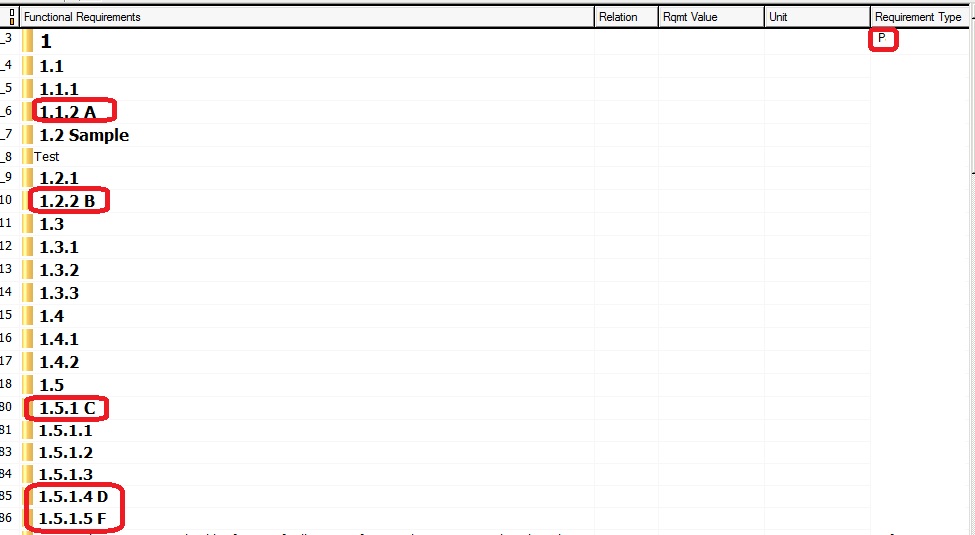
Background :
I am developing a Dialog Box with some buttons and on click of a buttons, I would be having the requirements inserted, where in I will have the objects hardcoded for the button functions.
Requirement :
The insertion of the objects should be done, only if it meets the Pre-Insertion Checks as the following Initial Conditions shall be verified before allowing an insertion of requirements.
The selected object X in a Module shall be a top level heading with Requirement Type "P"
Section X.1.2 shall be a Module object with the attribute Object Heading being "A"
Section X.2.2 shall be a Module object with the attribute Object Heading being "B"
Section X.5.1 shall be a Module object with the attribute Object Heading being "C"
Section X.5.1.4 shall be a Module object with the attribute Object Heading being "D"
Section X.5.1.5 shall be a Module object with the attribute Object Heading being "F"
Once the above are satisfied, I would be inserting the requirements onto the section.
Sample Module which would Pass the "Pre-Insertion Checks" is attached
Attachments
Attach.jpg
Re: Object Hierarchy Check
Mathias Mamsch - Thu Nov 19 06:01:17 EST 2015
HKrishnan - Thu Nov 19 05:34:56 EST 2015
Background :
I am developing a Dialog Box with some buttons and on click of a buttons, I would be having the requirements inserted, where in I will have the objects hardcoded for the button functions.
Requirement :
The insertion of the objects should be done, only if it meets the Pre-Insertion Checks as the following Initial Conditions shall be verified before allowing an insertion of requirements.
The selected object X in a Module shall be a top level heading with Requirement Type "P"
Section X.1.2 shall be a Module object with the attribute Object Heading being "A"
Section X.2.2 shall be a Module object with the attribute Object Heading being "B"
Section X.5.1 shall be a Module object with the attribute Object Heading being "C"
Section X.5.1.4 shall be a Module object with the attribute Object Heading being "D"
Section X.5.1.5 shall be a Module object with the attribute Object Heading being "F"
Once the above are satisfied, I would be inserting the requirements onto the section.
Sample Module which would Pass the "Pre-Insertion Checks" is attached
Ok, so as I said - i would simply cache the object levels of the selected object in a skip, and replace the originals object level by an X:
Object oSelected = current

string replaceObjectLevel (string topLevel, childLevel) {
  // e.g. topLevel = 1.2   and childLevel = 1.2.4.5.6
  // result should be X.4.5.6
}

void recursiveAddChilds (string sTopLevel, Object o, Skip sk) {
    put(sk, replaceObjectLevel(sTopLevel, level o))
    Object oChild; for oChild in all o do {
        if (isDeleted oChild) continue;
        recusiveAddChilds(sTopLevel, oChild, sk);
    }
}

Skip getChildLevelCache (Object oTop) {
    Skip skLevelCache = createString();
    String sTopLevel = level oTop;
    Object oChild; for oChild in all oTop do {
        if (isDeleted oChild) continue;
        recursiveAddChilds(sTopLevel, oChild, skLevelCache);
    }
    return skLevelCache;
}

// now you can use these functions to check your conditions
Object oTest = current

Skip skChildCache = getChildLevelCache(oTest);

Object oChild;

if (!find(skChildCache, "X.1.2", oChild) || oChild."Object Heading" "" != "A")
   error "oh no"

   ...
Maybe this gives you a head start ... Regards, Mathias
Re: Object Hierarchy Check
HKrishnan - Fri Nov 20 01:27:31 EST 2015
Mathias Mamsch - Thu Nov 19 06:01:17 EST 2015
Ok, so as I said - i would simply cache the object levels of the selected object in a skip, and replace the originals object level by an X:
Object oSelected = current

string replaceObjectLevel (string topLevel, childLevel) {
  // e.g. topLevel = 1.2   and childLevel = 1.2.4.5.6
  // result should be X.4.5.6
}

void recursiveAddChilds (string sTopLevel, Object o, Skip sk) {
    put(sk, replaceObjectLevel(sTopLevel, level o))
    Object oChild; for oChild in all o do {
        if (isDeleted oChild) continue;
        recusiveAddChilds(sTopLevel, oChild, sk);
    }
}

Skip getChildLevelCache (Object oTop) {
    Skip skLevelCache = createString();
    String sTopLevel = level oTop;
    Object oChild; for oChild in all oTop do {
        if (isDeleted oChild) continue;
        recursiveAddChilds(sTopLevel, oChild, skLevelCache);
    }
    return skLevelCache;
}

// now you can use these functions to check your conditions
Object oTest = current

Skip skChildCache = getChildLevelCache(oTest);

Object oChild;

if (!find(skChildCache, "X.1.2", oChild) || oChild."Object Heading" "" != "A")
   error "oh no"

   ...
Maybe this gives you a head start ... Regards, Mathias
Thanks Mathias
Will try to run thro this. By the way I was expecting a simpler way of child object check, something like below, which I have used for my current code. I Know my requirement is bit complex, but cant we achieve it by having a similar if condition ?
Module m = current
Object currObj = current Object
Object parObj = parent currObj
string strngToMatch1 = "A$"
string strngToMatch2 = "B$"
{
if ((level(currObj) > 1) && (matches(strngToMatch1, currObj."Object Heading""") || (matches(strngToMatch2, currObj."Object Heading""") || (matches(strngToMatch1, parObj."Object Heading""")) || (matches(strngToMatch2, parObj."Object Heading""")))))
{
//Insertion Statements
}
}
Re: Object Hierarchy Check
Mathias Mamsch - Fri Nov 20 03:14:04 EST 2015
HKrishnan - Fri Nov 20 01:27:31 EST 2015
Thanks Mathias
Will try to run thro this. By the way I was expecting a simpler way of child object check, something like below, which I have used for my current code. I Know my requirement is bit complex, but cant we achieve it by having a similar if condition ?
Module m = current
Object currObj = current Object
Object parObj = parent currObj
string strngToMatch1 = "A$"
string strngToMatch2 = "B$"
{
if ((level(currObj) > 1) && (matches(strngToMatch1, currObj."Object Heading""") || (matches(strngToMatch2, currObj."Object Heading""") || (matches(strngToMatch1, parObj."Object Heading""")) || (matches(strngToMatch2, parObj."Object Heading""")))))
{
//Insertion Statements
}
}
You problem is the navigation from parent to child. Of course you can make this easier. The solution I posted had a hidden assumption, to not depend on the displayset, i.e. to be stable against filtering. Other DXL functions allow easier navigation, but depend on the display set. You can always do something like this:
Object cur = current
// cur[1] = first child, cur[1][3] = third child of first child ...
if (cur."Object Heading") && cur[1]."Object Heading" "" == "..." && cur[1][3]."Object Heading" "" == ...)
So if you drop the requirement to be not dependend from the display set, the code simplifies and you can navigate easily. Of course you need still to care for null Objects so you will not get away with one If. Regards, Mathias
Re: Object Hierarchy Check
HKrishnan - Mon Nov 23 01:41:45 EST 2015
Mathias Mamsch - Fri Nov 20 03:14:04 EST 2015
You problem is the navigation from parent to child. Of course you can make this easier. The solution I posted had a hidden assumption, to not depend on the displayset, i.e. to be stable against filtering. Other DXL functions allow easier navigation, but depend on the display set. You can always do something like this:
Object cur = current
// cur[1] = first child, cur[1][3] = third child of first child ...
if (cur."Object Heading") && cur[1]."Object Heading" "" == "..." && cur[1][3]."Object Heading" "" == ...)
So if you drop the requirement to be not dependend from the display set, the code simplifies and you can navigate easily. Of course you need still to care for null Objects so you will not get away with one If. Regards, Mathias
Thanks Mathias Mamsch
This helped..
Below is code which I have comeup... 
I got only one concern, there is a DXL error if the Child level Object is not present, how to overcome that ?
Does DOORS give the feature to check object existance using "exists"
something like
if (exists object o[1][2]) ?? 
Module m = current
Object currObj = current Object
string strngToMatchType = "P"
string strngToMatchCondition1 = "^A$"
string strngToMatchCondition2 = "^B$"
string strngToMatchCondition3 = "^C$"
string strngToMatchCondition4 = "^D$"
string strngToMatchCondition5 = "^F$"

if (matches(strngToMatchType,currObj."Requirement Type"""))
{
 if (matches(strngToMatchCondition1,currObj[1][2]."Object Heading"""))
 {
  if (matches(strngToMatchCondition2,currObj[2][3]."Object Heading"""))
  {
   if (matches(strngToMatchCondition3,currObj[5][2]."Object Heading"""))
    {
     if (matches(strngToMatchCondition4,currObj[5][2][4]."Object Heading"""))
     {
      if (matches(strngToMatchCondition5,currObj[5][2][5]."Object Heading"""))
       {
       print "Success"
       }
     else
     print "Section X.5.1.5 must be a Heading with the text 'F'"
     }
    else
    print "Section X.5.1.4 must be a Heading with the text 'D'"
    }
   else
   print "Section X.5.1 must be a Heading with the text 'C'"
  }
  else
  print "Section X.2.2 must be a Heading with the text 'B'"
 }
 else
 print "Section X.1.2 must be a Heading with the text 'A'"
}
else
{
print "The Selected Object must be a top level heading with Requirement Type 'P'"
}
Re: Object Hierarchy Check
Mathias Mamsch - Mon Nov 23 02:12:27 EST 2015
HKrishnan - Mon Nov 23 01:41:45 EST 2015
Thanks Mathias Mamsch
This helped..
Below is code which I have comeup...
I got only one concern, there is a DXL error if the Child level Object is not present, how to overcome that ?
Does DOORS give the feature to check object existance using "exists"
something like
if (exists object o[1][2]) ??
Module m = current
Object currObj = current Object
string strngToMatchType = "P"
string strngToMatchCondition1 = "^A$"
string strngToMatchCondition2 = "^B$"
string strngToMatchCondition3 = "^C$"
string strngToMatchCondition4 = "^D$"
string strngToMatchCondition5 = "^F$"

if (matches(strngToMatchType,currObj."Requirement Type"""))
{
 if (matches(strngToMatchCondition1,currObj[1][2]."Object Heading"""))
 {
  if (matches(strngToMatchCondition2,currObj[2][3]."Object Heading"""))
  {
   if (matches(strngToMatchCondition3,currObj[5][2]."Object Heading"""))
    {
     if (matches(strngToMatchCondition4,currObj[5][2][4]."Object Heading"""))
     {
      if (matches(strngToMatchCondition5,currObj[5][2][5]."Object Heading"""))
       {
       print "Success"
       }
     else
     print "Section X.5.1.5 must be a Heading with the text 'F'"
     }
    else
    print "Section X.5.1.4 must be a Heading with the text 'D'"
    }
   else
   print "Section X.5.1 must be a Heading with the text 'C'"
  }
  else
  print "Section X.2.2 must be a Heading with the text 'B'"
 }
 else
 print "Section X.1.2 must be a Heading with the text 'A'"
}
else
{
print "The Selected Object must be a top level heading with Requirement Type 'P'"
}
Try something like:
if (!null o[1] && !null o[1][3] && !null o[1][3][4] && o[1][3][4]."Object Heading" "" == ....)
Re: Object Hierarchy Check
HKrishnan - Wed Nov 25 06:34:17 EST 2015
Mathias Mamsch - Mon Nov 23 02:12:27 EST 2015
Try something like:
if (!null o[1] && !null o[1][3] && !null o[1][3][4] && o[1][3][4]."Object Heading" "" == ....)
When using the above I get the error if an object is deleted (but not purged). How to over come that error ?